Working Around Apple's Device Name Entitlement with mDNS
Learn more about ShowShark here.
Starting in iOS 16, Apple began restricting access to the user-assigned device name. Apps that call UIDevice.current.name without the com.apple.developer.device-information.user-assigned-device-name entitlement get back a generic string: "iPad", "iPhone", "Apple TV". Not the name the user actually gave their device; just the product category.
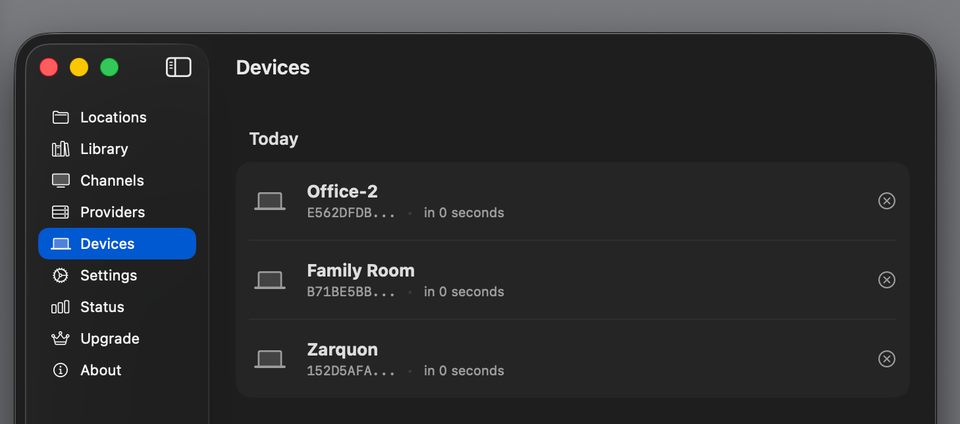
Apple gates the entitlement behind an approval process that requires justification, and they're not shy about rejecting requests. For a media server like ShowShark that displays connected devices in a management UI, this is a real problem. Imagine looking at your Devices screen and seeing three rows that all say "iPad". Which one is the living room? Which is the bedroom? You have no idea.
My initial application for the entitlement was rejected without any explanation. I'll prevail eventually, but when? It took me THREE MONTHS to get SpyAlert into the App Store just because Apple wanted one minor change and apparently it took them that long to figure out how to tell me. But I digress. I wanted a solution I controlled. And it turns out the answer was already being broadcast on the local network.
The Clue on the Wire
Every Apple device on your network advertises a constellation of Bonjour services such as AirPlay, Companion Link, Remote Desktop, sleep proxy, and many others. Each of these service advertisements includes the device's user-assigned name as the service instance name. Apple locks down UIDevice.current.name behind an entitlement, but the same information is freely available over mDNS to anything on the local network.
I fired up a service browser and found a goldmine:
_companion-link._tcp— every Apple device advertises this, with its real name_airplay._tcp— Macs and Apple TVs_rdlink._tcp— iOS devices with Remote Desktop_sleep-proxy._udp— Apple TVs acting as sleep proxies
The device named "Zarquon" in Settings was advertising itself as "Zarquon" across all of these services. The server just needed to listen.
The Architecture
The idea is simple: run Bonjour browsers on the server, build a mapping of IP addresses to device names, and look up connecting clients by IP when they authenticate.
ShowShark Server already uses NWBrowser on the client side for server discovery, so the Network framework patterns were familiar. But the use case here is fundamentally different: I'm not looking for one specific service type, I'm casting a wide net across multiple service types to build a lookup table.
I built a NetworkDeviceResolver actor that manages multiple NWBrowser instances simultaneously:
actor NetworkDeviceResolver {
    private var ipToName: [String: String] = [:]
    private var serviceEntries: [String: ServiceEntry] = [:]
    private var browsers: [NWBrowser] = []

    private static let serviceTypes = [
        "_companion-link._tcp",
        "_airplay._tcp",
        "_rdlink._tcp",
        "_sleep-proxy._udp",
    ]

    func start() {
        for serviceType in Self.serviceTypes {
            let parameters = NWParameters()
            parameters.includePeerToPeer = true

            let browser = NWBrowser(
                for: .bonjour(type: serviceType, domain: "local."),
                using: parameters
            )
            // ... configure handlers ...
            browser.start(queue: networkQueue)
            browsers.append(browser)
        }
    }

    func resolvedName(forIP ip: String) -> String? {
        ipToName[normalizeIP(ip)]
    }
}
The actor owns all the mutable state: the IP-to-name dictionary, the service entries for cleanup tracking, and the browser instances. The public API is just start(), stop(), and resolvedName(forIP:). That last call is O(1), that is a dictionary lookup, no network round-trips at query time.
From Service Name to IP Address
When NWBrowser discovers a service, the browse result gives you an endpoint like .service(name: "Zarquon", type: "_companion-link._tcp", domain: "local.", interface: nil). The name field is the device name. No TXT record parsing, no additional queries — it's right there in the service instance name.
But I need IP addresses, not service names. The server identifies connecting clients by their IP (extracted from the NWConnection at accept time), so I need to map service names to IPs.
The standard technique is to create a temporary NWConnection to the service endpoint. The Network framework resolves the Bonjour endpoint to an actual IP address during connection setup. Once the connection reaches the .ready state, you can extract the resolved address from connection.currentPath.remoteEndpoint and immediately cancel:
private func resolveEndpoint(_ endpoint: NWEndpoint, deviceName: String, ...) {
    let params: NWParameters = serviceType.hasSuffix("._udp") ? .udp : .tcp
    let connection = NWConnection(to: endpoint, using: params)

    connection.stateUpdateHandler = { [weak self] state in
        switch state {
        case .ready:
            if let path = connection.currentPath, let self {
                Task {
                    await self.processResolvedAddress(
                        path: path, deviceName: deviceName, ...
                    )
                }
            }
            connection.cancel()

        case .failed, .waiting:
            connection.cancel()
        // ...
        }
    }
    connection.start(queue: networkQueue)
}
One subtlety: UDP services (like _sleep-proxy._udp) need NWParameters.udp, not .tcp. UDP connections go to .ready immediately after DNS resolution since there's no handshake, which is actually faster.
The Dual-Stack Problem
My first version worked, mostly, sort of. The resolver discovered "Zarquon" and resolved it to fe80::c472:8ff:fe9d:58a9%en15. Great, the name was in the mapping. But when the iPad actually connected to the server, it connected over IPv4 at 192.168.1.50. The lookup missed because I only had the IPv6 address.
The problem: NWConnection resolves to one address. On a dual-stack network, it picks one address family (typically IPv6) and that's what you get. But the client might connect via the other.
The fix was a second resolution stage. After getting one IP from the NWConnection, I resolve the device's .local hostname via getaddrinfo to get all addresses:
private func resolveAllAddressesForDevice(name: String, endpointKey: String) {
    let sanitized = Self.sanitizeForLocalHostname(name)
    DispatchQueue.global(qos: .utility).async { [weak self] in
        let allIPs = Self.resolveLocalHostname("\(sanitized).local")
        guard !allIPs.isEmpty, let self else { return }
        Task {
            await self.storeResolvedAddresses(allIPs, ...)
        }
    }
}
getaddrinfo with AF_UNSPEC returns both A and AAAA records for the .local hostname, giving me both IPv4 and IPv6 addresses. The blocking DNS call runs on a background queue to avoid stalling the actor, and results are posted back.
After this change, the logs showed exactly what I wanted:
Resolved device 'Zarquon' at fe80::c472:8ff:fe9d:58a9%en15
Resolved 1 additional address(es) for 'Zarquon' via .local hostname lookup
That additional address was the IPv4 address, that is, the one the client actually connected with.
Hostname Sanitization
There's a catch with the .local hostname approach. Bonjour service names are display-friendly UTF-8 strings: "Chris's iPad", "Jose's MacBook Pro". But .local hostnames follow DNS rules. Apple sanitizes device names when deriving the hostname — stripping apostrophes, replacing spaces with hyphens, dropping special characters.
So "Chris's iPad" advertises as service name "Chris's iPad" but resolves at hostname Chriss-iPad.local. If you pass the raw service name to getaddrinfo, it fails.
I wrote a sanitization function that approximates Apple's hostname derivation:
private static func sanitizeForLocalHostname(_ name: String) -> String {
    var result = ""
    for char in name {
        if char.isLetter || char.isNumber {
            result.append(char)
        } else if char == " " || char == "-" {
            result.append("-")
        }
        // Apostrophes, punctuation, special characters are dropped
    }
    // Collapse consecutive hyphens and trim
    while result.contains("--") {
        result = result.replacingOccurrences(of: "--", with: "-")
    }
    return result.trimmingCharacters(in: CharacterSet(charactersIn: "-"))
}
This handles the common cases. For truly exotic device names, the sanitized hostname might not match Apple's actual derivation, but the failure mode is graceful: we just don't get the second address family, and the device falls back to whatever single IP the NWConnection resolved.
Integrating with Authentication
The resolver runs continuously in the background, building up its mapping as devices come and go on the network. When a client connects and authenticates, the server checks whether the reported device name is generic. If it is, it fires a non-blocking lookup:
// In the login handler, after successful authentication:
if DevicesManager.isGenericDeviceName(request.deviceName) {
    Task { [weak self] in
        guard let self,
              let resolver = self.networkDeviceResolver,
              let resolvedName = await resolver.resolvedName(forIP: clientIP)
        else { return }
        self.devicesManager.updateDeviceName(
            id: request.deviceIdentifier, name: resolvedName
        )
    }
}
Key design decisions here:
Only for generic names. Mac clients call Host.current().localizedName which returns the real name without any entitlement. There's no reason to override "John's MacBook Pro" with whatever mDNS happens to say. The resolver only activates for the generic names that signal a missing entitlement.
Fire-and-forget. The login response goes back immediately. The name resolution happens asynchronously in a detached Task. Nothing about the connection flow depends on having the resolved name. If the resolver hasn't built its mapping yet (the server just started), or the device isn't discoverable, the generic name stays until the next connection.
Persistent improvement. Once a device name is resolved, DevicesManager stores it. On subsequent connections, even if the resolver hasn't finished building its mapping, the stored name is preserved:
func addDevice(_ device: KnownDevice) {
    if Self.isGenericDeviceName(device.name),
       let existing = devices.first(where: { $0.id == device.id }),
       !Self.isGenericDeviceName(existing.name) {
        // Keep the better name, just update lastConnected
        let updated = KnownDevice(
            id: device.id, name: existing.name,
            identifier: device.identifier,
            lastConnected: device.lastConnected
        )
        // ...
        return
    }
    // ...
}
A device that once resolved to "Zarquon" stays "Zarquon" even if it reconnects before the resolver has finished its startup scan.
Approaches I Considered and Rejected
Applying for the entitlement. The obvious answer, but it puts you at Apple's mercy. They can reject the request, revoke it later, or change the policy. I wanted a solution that didn't depend on Apple's approval.
Asking the user to name their device in ShowShark. This works, but it's friction. Users already named their device in Settings. They shouldn't have to do it again in every app that needs the name.
Making BonjourDiscoveryEngine generic. ShowShark already has a BonjourDiscoveryEngine on the client side for server discovery. I considered refactoring it to accept arbitrary service types. But the two use cases are fundamentally different: client-side discovery needs TXT record parsing, server coalescing by ID, and connection candidate logic. The device resolver needs none of that. It just needs service names and IP addresses. Forcing them into a shared abstraction would have complicated both for minimal code sharing.
Reverse DNS lookup on the client IP. When a client connects, do a reverse DNS lookup to get its .local hostname, then match that against known service names. This avoids the NWConnection resolution step but adds latency to the lookup path, requires the hostname to match the service name (which it often doesn't for names with special characters), and still needs the mDNS browser running to know which names to match against. More complex, less reliable.
Service Cleanup
Devices come and go on a network. The resolver tracks which service entries map to which IPs, so when a device disappears from a Bonjour service, its IP mappings are cleaned up but only if no other service type still references that IP:
private func handleServiceRemoved(_ result: NWBrowser.Result) {
    let endpointKey = stableEndpointKey(for: result.endpoint)
    guard let entry = serviceEntries.removeValue(forKey: endpointKey) else { return }

    for ip in entry.addresses {
        let stillMapped = serviceEntries.values.contains {
            $0.addresses.contains(ip)
        }
        if !stillMapped {
            ipToName.removeValue(forKey: ip)
        }
    }
}
This matters because the same device appears across multiple service types. Removing _airplay._tcp for "Zarquon" shouldn't remove the IP mapping if _companion-link._tcp for "Zarquon" is still active.
There's a subtle race condition here too: the getaddrinfo call for .local hostname resolution runs on a background queue. If a service is removed while that DNS call is in flight, the callback could resurrect a deleted entry. The resolver guards against this by checking that the endpoint key still exists before storing results:
private func storeResolvedAddresses(...) {
    guard !isStopped else { return }
    guard serviceEntries[endpointKey] != nil else { return }
    // ...
}
What the Client Sends
For context, here's what the client reports to the server and why the server can't just use it:
static func getDeviceName() -> String {
    #if os(iOS) || os(tvOS) || os(visionOS)
    return UIDevice.current.name    // "iPad" without entitlement
    #elseif os(macOS)
    return Host.current().localizedName ?? "Mac"  // Always works
    #elseif os(watchOS)
    return WKInterfaceDevice.current().name
    #endif
}
On macOS, Host.current().localizedName returns the Computer Name from System Settings — no entitlement needed. On iOS and tvOS, UIDevice.current.name is the gated API. The asymmetry is why the resolver only activates for generic names: Macs don't need help.
Results
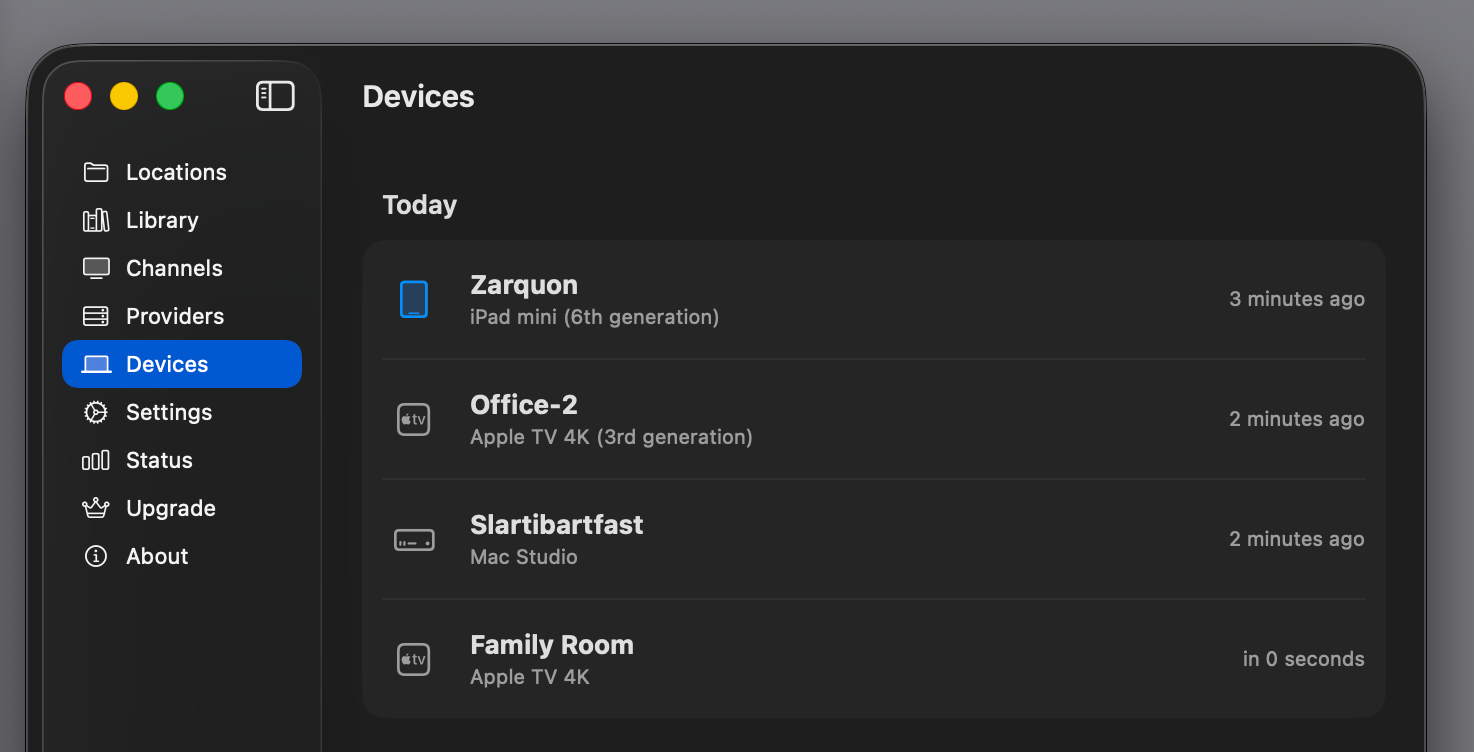
The Devices screen in ShowShark Server now shows actual device names. "iPad" becomes "Living Room iPad". "Apple TV" becomes "Bedroom Apple TV". The resolution happens transparently on first connection and persists across sessions.
The whole system is about 350 lines of Swift. It runs four NWBrowser instances on a utility-priority queue, resolves endpoints via temporary NWConnection objects, and falls back to getaddrinfo for dual-stack coverage. It never blocks the main thread, never delays authentication, and degrades gracefully when resolution fails.
This workaround has been brought to you because Apple, for some reason, feels the need to protect you from yourself. Congratulations.
Addendum. We now have device-appropriate icons and the device type to go along with the device name, rounding out the aesthetics of device management in ShowShark Server.
Thanks, Apple, for making this as difficult as possible.