
ShowShark Release Notes v2026.04.27
Just some quick thoughts. I know I've said this before about ShowShark, and thought this before about countless other projects, but I don't want to bloat ShowShark with unnecessary complexity, and I feel like it is approaching maturity. It works and it works well. There's always minor polish to improve the user experience, particularly on the tvOS side of things, which is consistently the most challenging user interface to get Just Right(tm).
I suppose the core principle to apply here is that new features shouldn't negatively impact the core performance – the efficiency with which the server can transcode movies, and the playback performance of the client.
If I do decide to explore additional features, the only major ones I've got in mind at the moment are:
- DVD ISO / Video_TS – limited audience; lots of GPL stuff to avoid
- Screentime – admin devices get to credit screentime to other devices
They're all solid features, but I just don't have a feel for the user demand being adequate to justify the "bloat". I'll keep pondering them.
I did add one "bloat" feature to this release – actually two – of which I'm still someone on the fence: IPTV and Intro Detection & Skipping. If you have a cable subscription with IPTV support, you can stream all of your channels in ShowShark. And if ShowShark can detect the intros in your TV shows, you'll now see a Skip Intro button to jump right past them.
Overview
- Profiles are now a first-class concept across Client and Server. Play history, playlists, favorites, and watch stats belong to a person who can move between devices, and a new Profiles tab on the Server lets you create, edit, merge, and delete them. The Client lets you switch profiles from the Settings tab or — on tvOS — the tab bar.
- Network shares (SMB) join Local and S3 as a third kind of Location, so you can point the Server at a NAS on your local network and pull media straight from the share without copying it to the Server's disk first.
- IPTV (Live TV) is now a first-class Location type alongside Local, S3, and SMB. Add an M3U playlist or Xtream Codes subscription on the Server and live channels mix into the existing Channels tab on every Apple platform, streamed through the same WebSocket pipeline as local files. Now / Next EPG, daily catalog refresh, and shared per-channel decoding for multiple simultaneous viewers all come along.
- Movie trailers now play directly from
MovieDetailView. Tap the new clapperboard button on a movie with a known trailer and the server streams the YouTube trailer through the ShowShark video pipeline — same bitrate-adaptive quality, same subtitles-if-you-want-them client-side overlay. - TV show intro detection & skipping. The Server fingerprints each episode's opening audio, finds the shared intro across a season, and Clients surface a Skip Intro button at the right moment on iOS, tvOS, macOS, and visionOS. Silently disabled where it would not make sense (trailers, audio-only, channels, short episodes).
- Redesigned "By Feel" discovery. The recommendation engine now takes three-state votes (tap once for thumbs-up, again for thumbs-down, again to clear), stops penalising cards you never touched, spreads candidates across your library with a randomised-tiebreak selector so the same openers don't keep appearing, and reflows grids per platform (5×1 on Apple TV / iPad landscape / Mac wide / visionOS, 3×2 on iPad portrait, 2×2 on iPhone).
- Faster, self-healing remote access over the tailnet. WebSocket traffic over your tailnet now skips the redundant TLS layer that was slowing down connection setup on cellular and slow links — WireGuard already provides end-to-end encryption, so the extra handshake was pure tax. The Server also monitors its own remote-access lifecycle and recovers automatically from network changes, sleep/wake transitions, and transient cloud-side blips, with the Status tab surfacing live state and an actionable last-failure reason when something is genuinely wrong.
- Durable Sign in with Apple sessions. Sign in with Apple identity tokens are now refreshed on demand in the background, so existing users no longer hit periodic re-sign-in prompts. When Apple does revoke a session, the app shows a single global alert with a one-tap Sign In button.
- Admin-configurable server display name lets the Server admin override the machine hostname shown to clients in server lists, login responses, and watch party invites.
- Streaming and playback reliability. A client-side video starvation watchdog now surfaces a buffering indicator after 2s of silence and gracefully recovers (or goes offline) at 10s. DTS tracks in the audio-only path no longer produce corrupt DC-signal output. A long-standing race between request timeouts and live streams — which had been silently truncating thumbnail grids — has been fixed, and server handler errors now surface at the client in milliseconds instead of a 30-second spin.
- Security and hardening. The Server's master password moved out of UserDefaults into the Keychain. Per-client inbound message rate-limiting, a 16 MB WebSocket message ceiling, S3 path-traversal rejection, and a bounded download write buffer close a series of defense-in-depth gaps. Downloads now surface accurate disk-space failure causes instead of always blaming "not enough free space".
- Performance. Library scans are noticeably faster on large libraries. The Status tab is lighter on CPU when many sessions are active. The audio visualizer no longer hitches the UI when you toggle it off.
- tvOS polish. The green-glow focus idiom now extends to the
ActorBrowseViewtoolbar (with focus-section fixes so you can swipe up from any grid cell), empty playlists no longer overlap the toolbar, and a long-standing black-screen regression when starting playback from the thumbnail grid has been squashed.
Profiles
- Profile-scoped state separates "who is watching" from "what device are they using". Play history, playlists, favorites, and watch stats now belong to a profile, so switching profiles on any device instantly loads the right data. The database migrates existing device-scoped data transparently on first launch under the new Server build
- Server Profiles tab lets you view, create, edit, merge, and delete profiles. Each row shows a three-item stats strip (movies, shows, music — each with count and cumulative watch time) plus an active session indicator and a "Default for N devices" subline
- Profile editor lets you rename, pick a new avatar, designate the profile as the Server's default for new devices, merge into another profile, or delete. Deletes cascade through history, playlists, and watch stats; devices that used the deleted profile as their default get a fresh profile auto-created on next connect
- Profile merge consolidates two profiles into one. All history, playlists, watch stats, and device bindings move from source to destination; active watch party host IDs are rewritten atomically; conflicting album history rows resolve by keeping the destination row
- Client profile switcher appears as avatar cards in the Settings tab and as a dedicated tab-bar button on tvOS. Tap a card to switch with a confirmation dialog; tap the active card to open the editor. Switching immediately reloads play history, watch stats, and playlists, so the Playlists and History tabs never transiently disappear
- Default Profile for New Devices toggle in the Server editor assigns newly-connected devices to a chosen profile automatically instead of creating a fresh one every time. A green "Default" pill on the profile row shows which profile is currently the default
- First device is admin. When a fresh Server has no devices on record, the first device to log in is granted admin automatically, eliminating the chicken-and-egg of needing an admin to promote the first admin
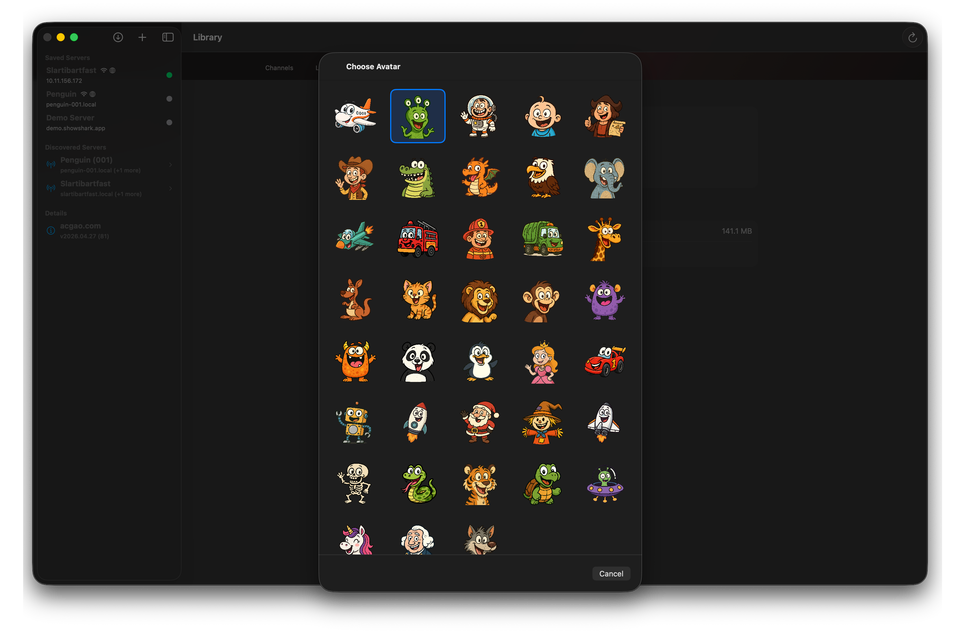
- Bundled avatar catalog replaces the old SF Symbol icons with custom artwork. Avatars are served from the Server, cached on the Client, and assigned deterministically to new profiles via a stable hash of the profile ID. The Client and Server both present enlarged, browsable pickers; on tvOS, the picker is a full-screen grid with the green focus glow
- Missing watch time fix for playback that ends naturally — watch time now increments on natural end-of-stream for audio, video, BDMV, and HLS sessions, not just when the Client sends stop. Full-track and full-video completions no longer silently skip the stats update, which was especially noticeable for album-style listening
Network Shares (SMB)
- SMB/SMB3 shares as a first-class Location type alongside Local and S3. Add them from the Server's Locations tab; the rest of the app sees them as virtual paths over the existing wire protocol, with no Client, database, or wire-protocol changes
- Server-side discovery browses
_smb._tcpvia Bonjour when you open the Add SMB Location sheet. If your NAS advertises itself you can pick the server from a list; if not, enter host and share manually - Share picker lists the shares exposed by the selected server. Falls back to manual entry if the server refuses IPC$ enumeration
- Browse Share folder picker replaces blind sub-path entry on both Add and Edit sheets. Drill into the share with a visual folder browser that only shows directories; typing mistakes no longer produce a silently empty library
- Password safety — the SMB password is stored in the Keychain instead of alongside the rest of the location configuration. Removing a location purges the Keychain entry
- Path-traversal defence. Requests containing
..,., empty segments, null bytes, or Windows-style backslashes are rejected at two layers (virtual-path mapper and SMB provider) before reaching the SMB library - Read-only by construction. The SMB provider exposes
listDirectory,readData,fileSize,fileExists, andtestConnection— no upload, delete, rename, or mkdir surface anywhere in the code path - Resilient sessions — long-idle and NAS-sleep failures trigger a single reconnect-with-backoff automatically; permanent errors (bad credentials, missing share, SMB1-only server) surface immediately instead of retrying forever
IPTV (Live TV)
- First-class IPTV integration. Configure M3U playlists or Xtream Codes subscriptions on the Server's Locations tab; live channels appear in the existing Channels tab on every client and stream through the same WebSocket raw-frame pipeline as local files. Watch Party, the bitrate-adaptive video pipeline, and the client-side subtitle overlay all work transparently. Provider passwords are stored in the Keychain and removing a provider purges its credentials and tears down any active sessions
- Three-screen browse flow on iPhone, iPad, Mac, and visionOS — provider card → category pills → 16:9 channel-logo grid — matching the existing Movies / Shows idiom. tvOS uses a focus-friendly lane layout sized for the 10-foot UI
- Daily catalog refresh keeps channel listings and EPG data current; a manual "Refresh now" button on each provider row forces an immediate sync, and a sync-error badge on the provider card surfaces stale data instead of silently keeping it
- Now / Next EPG appears in the player chrome immediately when you tune a channel, so you know what is on (and what is next) without leaving the player
- Shared per-channel decoding — multiple clients tuning the same channel share a single upstream feed, so two iPads on the same channel does not double the network or transcoder load
- Rolling-URI playlist fix — providers that mint cache-busting tokens on every playlist refresh used to make the player rewind ~20 seconds every 30 seconds. The Server's HLS pipeline now tracks live position by media sequence rather than URI equality, so the picture is monotonic
- Logo card layout — channel-logo cells are 16:9 (which fits the broadcast-bug logos most providers ship), with
.scaledToFit()so the occasional square or 2:3 logo letterboxes cleanly instead of stretching
Movie Trailers
- Play Trailer button on
MovieDetailViewfor any movie with a known trailer (hidden silently when none is available). EOS pops back to the detail view instead of auto-advancing, and resume offsets are remembered per-session in client memory so re-tapping Play resumes where you stopped (and automatically restarts from the beginning within the final minute) - Server-side trailer resolution. The Server uses TMDB's YouTube trailer ID and bundled yt-dlp to turn it into a streamable URL, feeds the result through the existing GStreamer pipeline, and streams it to the Client with the same adaptive bitrate treatment as any other title. Trailers are private sessions — no watch-party broadcast — and never write to play history
- Simplified trailer UI — Download, subtitle track picker, watch-party invite, and auto-advance are hidden while a trailer is playing, since none of them are meaningful for a YouTube trailer
- Trailer ID backfill runs once at startup after the database upgrade and then every 7 days, filling in trailer IDs for movies TMDB has a trailer for but the local database doesn't. Respects the existing TMDB rate limit
- Permanent-failure handling — if a trailer is unavailable, geo-restricted, or age-gated, the Server clears the stored ID so the button hides on the next detail-view render and no future retries occur. Transient failures (timeout, network error) preserve the ID for a later attempt
Intro Detection & Skipping
- Skip Intro button appears on iOS, tvOS, macOS, and visionOS when playback is inside a detected intro range. Fades in gently and shows a "Skipped intro" toast on press. On tvOS the button is passively focusable — swipe up to grab it if you want to skip, leave it alone if you want to watch the opening
- Server-side intro fingerprinting analyses each episode's opening audio once and finds the shared intro across the season. Detected intros are stored on the episode row and shipped alongside the playback response, so the Client knows exactly when the intro starts and ends without a second round trip
- Handles long cold opens — shows with a short bumper followed by a longer title sequence a few minutes in (Star Trek: Strange New Worlds is the canonical case) are detected correctly. The matcher scans up to 20 minutes deep and prefers the longest intro shared across the season
- Runs in the background. A one-shot pass on Server startup picks up anything new, and a weekly re-check catches shows that arrived between passes. Transient failures retry up to three times; permanently-failing files drop out cleanly instead of being re-tried forever
- Silent opt-out for trailers, audio-only files, offline packages, channel programming, and episodes under 5 minutes
- Library tab progress — the Intro Detection section in the Server's Library tab shows live progress while the analyser is running, including the show and season currently being worked on, plus pending / analyzed / skipped / failed counters. Progress reads from an in-memory signal the analyser updates directly, so the footer reflects real work even during the long PCM-decode phase and when seasons are being re-processed from the fingerprint cache
- User-controlled Pause / Scan — the Library tab footer now has a single bordered button beneath the progress bar that reads "Pause" while a pass is running and "Scan" otherwise. Pause parks the analyzer at the next checkpoint (so a server restart doesn't hog CPU unannounced), and Scan kicks off a fresh pass immediately. The state is persisted across launches
- Offline-volume awareness — the analyzer no longer attempts to fingerprint episodes whose volume is currently unmounted. Previously, an unplugged external drive at boot produced thousands of "no local file linked" log entries and quietly bumped each affected episode's retry counter, which could eventually mark the whole library as permanently failed. Offline volumes now skip silently with a single per-season summary line and zero database writes — the next pass with the volume mounted picks up exactly where it left off
- Pending counter accuracy — the Library tab's "pending" number now matches the set the analyzer would actually pick up (episodes with non-trivial duration). Previously the panel showed hundreds of episodes from short-form children's content that the analyzer correctly skips, so the bar perpetually looked stuck near the same number
Discovery (By Feel)
- Three-state vote replaces the old "selected / not selected" model. Tap a card once for thumbs-up, again for thumbs-down, again to clear. Cards you never touch stay at neutral and contribute no signal — no more penalties for ignoring cards you simply didn't want to rate
- Softer vote magnitudes. Each up or down contributes ±0.5 instead of ±1.0 to the running preference, so no single round can dominate the final ranking
- Stratified random opener selection — Stage B of candidate selection now draws a weighted-random winner from the top five candidates instead of always picking the deterministic best. Near-ties rotate across sessions, so libraries with thousands of titles no longer keep offering the same short list every time
- Per-platform grids — 5×1 on Apple TV, iPad landscape, Mac wide window, and visionOS; 3×2 on iPad portrait and Mac tall window; 2×2 on iPhone. The wide-aspect layouts use a single row deliberately: two rows of 2:3 posters don't fit on 16:9 without scrolling, and the whole point of the grid is a single-glance comparison
- Header toolbar — Skip to Results and Next buttons moved from a bottom action bar into the round header, so iPad portrait no longer has to scroll past the grid to reach them
- tvOS focus polish — the header is a focus section, so swiping up from any grid card lands on a button; the cards fit the viewport with a visible top/bottom margin; focus shadows bleed cleanly past the scroll bounds
Remote Access & Networking
- Plain WebSocket over the tailnet — traffic over your tailnet connection now skips the redundant TLS handshake that was costing 1.5+ RTTs of setup on slow links (cellular wakeup, DERP-relayed connections, lossy Wi-Fi). WireGuard already provides authenticated encryption, peer authentication, forward secrecy, and integrity on the tailnet path, so the outer TLS layer was pure overhead. LAN connections still use TLS as before
- Self-healing remote-access lifecycle. The Server now monitors the health of its tailnet connection on a fixed cadence and recovers automatically from network changes, sleep/wake transitions, and transient cloud-side blips. Recovery uses bounded-backoff retries and rate-limits credential refreshes so a flaky network can't trigger an avalanche of round-trips. Permanent failures surface in the Status tab with a clear last-failure reason instead of leaving the connection silently broken
- Tailnet panel in the Status tab shows live connection state, last-healthy time, last-failure reason, and consecutive-failure count, so you can tell at a glance whether a "remote access not working" report is a server, network, or credential issue
- Invite generation gates on full reachability — invite codes are now only generated when the tailnet node has an IP and the bridge is actively accepting connections, instead of just the node having an IP. Closes a window where a freshly-generated code could point at a node that wasn't accepting traffic yet
- Dynamic IP assignment — clients connecting remotely now look up the Server's current address per-connect rather than caching the IP from the last successful login. Stale IPs from previous sessions no longer cause the chicken-and-egg "stale IP is the reason it can't reconnect" failure
- Recovery-aware Status surfacing in the Remote app — outages that aren't directly the Remote app's fault (cloud-side proxy issues, port-forward changes, DNS) now produce a distinct warning in the Dashboard and Nodes tabs instead of a generic failure that you couldn't act on
- Server-reported errors surface instantly at the Client. When a Server-side handler throws, the Client used to spin until its 30-second timeout expired; the Server now returns an error envelope the Client resolves in milliseconds, and the message shown to the user includes the Server's actual reason (login failures, playback start failures, directory listing failures, etc.)
Server
- Admin-configurable server display name — a new "Server Name" field in Server Settings lets the admin override the default machine hostname that clients see in server lists, login responses, and watch party invites. The override takes effect immediately for wire-protocol responses; Bonjour advertising and tailnet hostname update on the next server restart, with an in-app caption noting when a restart is needed. Clearing the field reverts to the machine hostname
- Real audio codec in the Status panel — audio-only sessions now display the actual output codec (AAC or PCM) plus real sample rate, channel count, and bitrate instead of the hardcoded "PCM 44.1kHz stereo 2.8 Mbps" row every session used to show
- Faster library scans — cached regex patterns in the directory parser eliminate per-file compilation. A 1,000-file library scan saves a handful of seconds; a 10,000-file library scan saves tens of seconds
- Safer Server startup — the programming store's initial load now completes before anything else in the Server lifecycle can write to it, closing a narrow race where a client request arriving during cold boot could overwrite a partially-loaded channel schedule on disk. The message-router coordinator is also required at init time rather than assigned deferred, so the very first inbound message after launch can no longer silently drop its response
Client
- Tab-contextual refresh — the toolbar refresh button and pull-to-refresh now fetch only the data relevant to the active tab (directory listing on Library, channels + watch parties on Channels, play history + stats on History, and so on) instead of reloading everything. Faster in practice, and it finally lets you refresh profile data from the Settings tab
- Play button icon distinction — play buttons that navigate to the playback view now use a different SF Symbol from the play buttons within the playback view that actually start playback, making their purpose clearer at a glance
- Watch progress indicator improvements — the pie-arc indicator now has a muted full-circle backdrop so small progress values read clearly as partial completion of a whole rather than a floating sliver. It still enforces a visual minimum of 15% fill when any progress exists, and scales proportionally to its adjacent text using font metrics rather than a hardcoded size, keeping it properly sized across iOS, tvOS, macOS, and visionOS
- Scrub preview overlay returns to playback — dragging the scrubber on iOS, macOS, and visionOS shows a thumbnail of the target minute while you drag. Paused skip +/-30 shows the preview on all four platforms, including tvOS. Thumbnails come from the per-minute set the thumbnails grid already uses, so visiting the grid warms the overlay and vice versa. Silently disabled for trailers, offline packages, audio-only files, and videos under one minute
- Actor view toolbar buttons — the actor browse view now has play and playlist buttons below the actor photo, matching the pattern in
MovieDetailView - Audio visualizer toggle-off no longer hitches the UI. The spectrum-tap removal used to block the main actor for 5–50ms waiting on the audio render thread to drain its callback; the tap now detaches asynchronously while the UI returns immediately
- Mac sleeps again while video is paused. On macOS, pausing a video and walking away used to leave the system's display-sleep block held indefinitely because the assertion was acquired on the player view's appearance and only released on disappearance. The Client now toggles the assertion alongside playback state — held while playing, released on pause / buffering / idle — matching the audio player's existing behaviour
tvOS
- Standardised green focus glow across every grid, list, and chip throughout the app. The double-stacked shadow idiom (a tight inner halo plus a wider outer bloom in
MediaStyle.focusGlowColor) now applies to posters, playlists, library folders, discovery cards, preference round candidates, By Feel mood cards, profile avatars, genre chips, season chips, episode chips, actor photos, and more. Buttons no longer scale up or invert colors on focus - Show Detail episode list replaces the previous full-width row layout with compact wrapping episode chips inside each season section. Each chip shows the episode number, title, and watch progress indicator; chips flow horizontally and wrap as needed, reclaiming significant vertical space for shows with many episodes
- Now Playing button in tab bar — when background audio is playing, a purple music-note button appears beside the profile avatar in the tvOS tab bar, providing one-press access to the music player or stop controls
- Profile editor full-screen presentation on tvOS instead of a sheet. Sheets on tvOS blur text field contents while focused because of how the system composites the vibrancy layer;
.fullScreenCovereliminates that. Same fix applied to Watch Party creation and editing sheets - Profile editor auto-save on dismiss, matching the Settings pattern — changes commit when you back out instead of requiring a separate Save button that was unreliable to focus from the form
- Library and Playlists grid alignment — both tabs now share the same cell structure, the same subtle blue-gradient backing (down from the prior two-tone wash so the focus glow dominates when a cell is focused), and the same focus-glow treatment. A latent crash mode in the SwiftUI focus engine when custom button styles wrapped a GeometryReader label plus sibling text has been fixed along the way
- Discover tab — the main Discover hub cards (Movies / TV Shows / Music navigation) and the Recently Added grid now use the standard green focus glow, unifying behaviour between items with posters and items without
- Server list auto-focus — when the tvOS server management view appears, the most recently connected saved server is automatically focused so you can press Select to reconnect without first swiping through the shelf
- ActorBrowseView focus navigation — swiping up from any horizontal position in the actor's grid now reliably lands on the toolbar buttons, not just from cells aligned with the centered buttons
- Track selection picker fix — the pre-playback audio track, subtitle track, starting chapter, and output resolution pickers now correctly apply the selected value. The pickers use inline button-based selection rows that apply immediately on tap
- Skip Intro button now claims focus and activates on tvOS. The button is now hosted on the playback transport row (right of the subtitle button) and the controls overlay forces itself open the moment an intro begins, so the focus engine can actually see and route to it. Press routes through the standard tvOS long-press gesture pattern instead of the inner Button that the focus engine was swallowing
- Unified card chrome across every grid. Every clickable tile in the app — Movies, Shows, Albums, Songs, Artists, Genres, Actors, Episodes, Photo Albums, file-browser folders and thumbnails, local Channels tiles, Playlists, Watch-Party tiles, IPTV provider and channel tiles — now renders its art plane through a single shared modifier with a fully-opaque backing. Shadows and the green focus glow now read consistently on every card; previously, translucent tiles (gradient fills, faded placeholders, semi-opaque IPTV logos) cast invisibly weak shadows because SwiftUI samples alpha when computing shadow intensity
Watch Party
- Empty playlists show management buttons on tvOS — you can now edit, change the icon, or delete an empty playlist without having to add content first. The Play button is hidden when the playlist has no items (rather than disabled)
- Full-screen sheets on tvOS for Watch Party creation and editing, fixing the focus-blur issue where text fields became unreadable while being typed into. The invite share view and the edit flow both get the same green focus glow treatment as the rest of the app
- Channels tab cleanup — tvOS no longer shows a permanent empty Watch Parties header plus a Join Watch Party button when no active parties exist. The section appears only when there are active parties, matching iOS and macOS. The tvOS-specific join button has been removed from that location
- App Store link fix on the Join Watch Party web page that guests see when they open a shareable invite link
Streaming, Video & Audio
- DTS audio corruption fix in the audio-only path.
GStreamerAudioSessionuseddecodebinfor its decode stage, which is known to mishandle DTS by emitting a constant ~0.937 DC signal instead of decoded audio. The session now uses the same metadata-driven branching as the HLS path: DTS tracks go through an explicitdcaparse → avdec_dcachain, TrueHD gets its own path, and everything else falls back todecodebinunchanged - Video frame queue starvation watchdog on the Client. Transport-alive but data-not-flowing stalls (application-level server stalls, hung handlers, wedged decoders) previously froze the Client indefinitely with no UI feedback. The watchdog now surfaces a buffering indicator after 2 seconds of empty frames and, after 10 seconds, either reconnects (online) or surfaces a playback error (offline). Tick-gap detection avoids false positives when the app is backgrounded or the window is occluded
- Thumbnail batch termination fix. The thumbnail generator's 3-consecutive-failures "likely end of stream" heuristic conflated genuine EOS with transient stalls (slow disk, sparse keyframes, codec warm-up after flushing seek), aborting whole batches with hours of media remaining. The check now asks the GStreamer appsink directly whether it has reached EOS, and the consecutive-failure cap moved up to 10 with a short backoff — so a few nearby transient stalls no longer kill the run
- Unified audio decoder selection. The HLS path and the primary decode pipeline now share a single audio decoder chain selector, so codec-specific fixes (caps-aware Dolby decoder ranking, native
flacdec/opusdecinstead oflibavwrappers, DC-blocker bypass flags) land in one place. HLS had been frozen at a March 2026 baseline and had missed several audio-correctness fixes; those are now all present - A/V sync compensation for audio output route latency on tvOS. Playback over HDMI to an AV receiver was freezing — one new video frame every 5–10 seconds, audio continuing normally — because the sync controller's master clock was running ~80–150 ms ahead of the audio actually reaching the speakers. Apple TV (and AirPlay / Bluetooth audio) now subtracts the route's reported output latency from the audio-render-time clock, and the drop loop's late-frame grace period was widened so the head frame doesn't sit on the threshold. iOS playback was always unaffected; this only changes tvOS behaviour
Downloads
- Accurate failure reasons — the disk-space probe used to return 0 on any failure, which the Downloads UI then surfaced as "Not enough free disk space" regardless of the real cause. The probe now distinguishes three outcomes explicitly: sufficient space, insufficient space (with live available-byte figures), or probe unavailable (with the underlying error description, e.g. "Downloads folder is unavailable: stale security-scoped bookmark"). All failure paths log the root cause instead of silently swallowing it
- Bounded download write buffer — the network-to-disk queue used to be unbounded, so a slow disk (external drive, encrypted volume, thrashing system disk) could queue hundreds of megabytes of encoded video until the Client OOMed. The queue is now capped at 8,192 operations and overflow fails the download cleanly with a user-facing message instead of crashing the app
Security & Hardening
- Master password moved to the Keychain. The Server's connection password used to sit in UserDefaults as a plaintext plist entry — readable to anything that could grab
~/Library/Preferences/*.plist(Time Machine snapshots, iCloud Drive library backups, restored disk images). It now lives in the Keychain undercom.acgao.ShowShark, migrated on first launch with an idempotent, non-destructive migration that never drops the value on failure - Per-client inbound rate limit — a token-bucket limiter (200-burst, 100 msg/s refill) caps how fast a single client can drive inbound requests. Refused messages are dropped, not queued, so a hostile client cannot use the limiter as a server-side backlog. Login is exempt (the existing per-IP login throttle covers it)
- 16 MB cap on inbound WebSocket messages. The Server now rejects oversize WebSocket frames at the framing layer, before they become a
Dataallocation. Previous default was effectively unbounded; an authenticated client could have pinned many GB of server memory across their allowed connection slots by sending giant frames. The HTTP path already had an equivalent 64 KB cap - S3 path-traversal rejection. S3 virtual paths from Clients now go through a two-layer check (virtual-path mapper + S3 provider) that rejects
..,., empty segments, and null bytes. AWS proper treats S3 keys as opaque, but S3-compatible gateways fronted by reverse proxies that perform RFC 3986 path normalisation could have let a traversal escape the configured key prefix. SMB locations inherit the same check - Sign in with Apple identity hardening. Authenticated calls between the Server and ShowShark's cloud endpoints now go through a stronger identity-proof chain on every request. The change is fully backward-compatible — existing signed-in users do not need to do anything
- Durable Sign in with Apple sessions — identity tokens are now refreshed on demand via Apple's authoritative refresh path, with the resulting refresh tokens kept on the server side (per machine) so users no longer hit periodic re-sign-in prompts as Apple rotates its signing keys. When a session is genuinely revoked (Apple invalidates it, or the local token fails verification for any other reason), the app surfaces a single global alert with a one-tap Sign In button; existing pre-rollout users land on the durable path automatically the next time they SIWA
Bug Fixes
- tvOS black screen when starting playback from thumbnails — tapping Play in
ThumbnailDetailViewcould produce a black video surface because a pop-animation-driven structural change in the playback view fired a spuriousonDisappearthat scheduled an immediatestopPlayback. The pending stop now debounces for 200ms; legitimate back-navigation teardown is unaffected becausestopPlaybackis idempotent - tvOS empty playlist layout overlapping toolbar — the empty-state view now fills remaining space and centers below the toolbar instead of stacking on top of it
- Truncated thumbnail grids. A race between a request's timeout firing and a streaming response arriving could leave the Client's request correlator with a dead entry while the stream kept producing chunks — producing a grid that silently reported "complete" with remaining thumbnails dropped. Every streaming request now carries a per-entry epoch, so a stale timeout that finds a refreshed entry exits without interfering
- Channel program auto-advance no longer interrupts the last 30 seconds of playback — a monitoring timer was prematurely triggering program transitions based on wall-clock estimates, causing a stop-restart cycle every 10 seconds during the final half-minute of each channel program (which also reset adaptive bitrate back to 2 Mbps each time). The redundant timer has been removed; the existing end-of-stream handler already transitions correctly when the program finishes naturally
- Pre-playback subtitle selection now applies to client-side text subtitles — choosing a subtitle track before starting playback correctly activates the client-side overlay for text-based subtitles (SRT/ASS/SSA). Previously, the selection was sent to the server but the client overlay was not informed, resulting in no visible subtitles despite the data being streamed and buffered
- Album track number layout on tvOS no longer wraps for multi-digit track numbers. The track number column uses intrinsic layout sizing based on the widest track number in the album, so 100-track albums display cleanly with all numbers on a single line and right-aligned consistently across rows
- Visualizer style picker on macOS now opens at a usable height instead of collapsing to just the title bar, and has a Cancel button in the toolbar matching iOS and visionOS
- Profile avatar styling — the default faint rounded-rect stroke around profile avatars on Server and Client has been removed (the artwork has its own framing), and the Client Settings selection outline now sits just outside the avatar bounds so the active-profile ring reads cleanly
- Remote app error visibility — first-launch failures writing key configuration files used to fail silently, leaving the next launch in a half-initialised state. Those writes now surface into the existing
lastErrorobservable the start/stop UI already displays