New Apple Watch client with full media browsing, playback, and server connectivity. The watch app connects to the ShowShark Server via HTTP long-polling (since watchOS blocks direct WebSocket connections) and streams media using HLS
HLS video and audio playback on watchOS with optimized transcoding (198x242 at 400 kbps) sized for the watch display and Bluetooth relay throughput. The server generates 2-second HLS segments for fast startup, and the watch buffers several segments before playback begins, showing a countdown timer during buffering
Channels and history on the watch home screen matching the iOS layout -- Video, Audio, and Photo Channel sections (hidden when empty), plus Library and History. Tapping a channel starts playback directly; tapping a history entry resumes from the saved position
Digital Crown volume control during playback, resolving crown sequencer errors that occurred when no view was associated with the Digital Crown
Server disconnect button on the watch library root for returning to the server list
Connecting spinner on the server list with double-tap prevention during connection attempts
Program title display during channel playback instead of the generic channel name
Services unavailable alert after login if the server's HTTP Polling or HLS services are disabled, so users understand why playback won't work
Audio session lifecycle fix preventing repeated playback failures -- uses watchOS async activation and avoids deactivating the audio session between plays
Content Discovery
Recommendation engine with three discovery modes for finding media in your library:
Similar To -- select a movie or show from your library and get the top 10 most similar titles, scored by keyword overlap, genre overlap, cast overlap, year proximity, and rating proximity
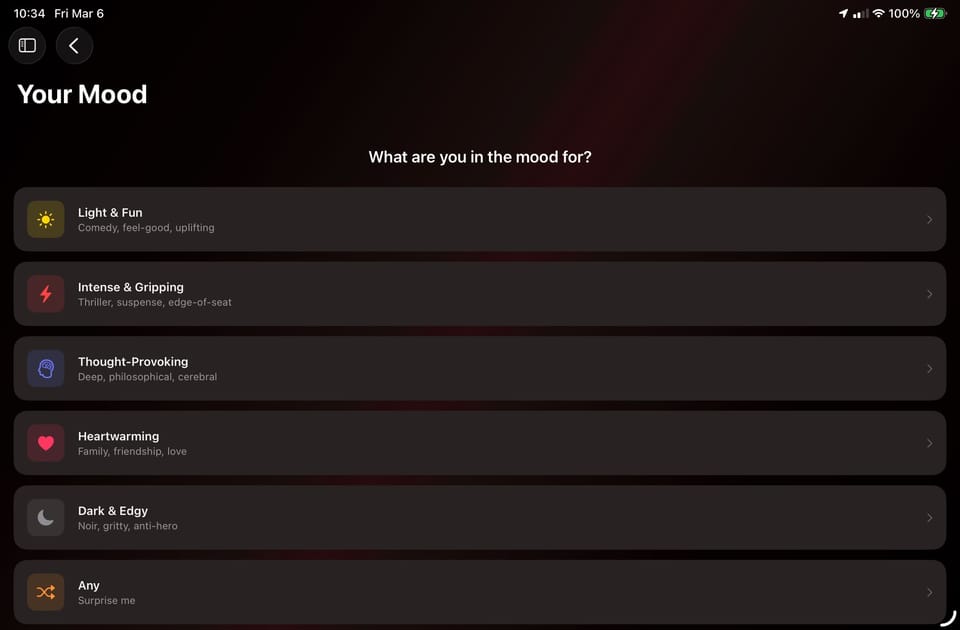
By Feel -- filter your library by time commitment (quick / medium / long / epic) and mood (light & fun, intense, thought-provoking, heartwarming, dark & edgy), then narrow results through a binary search flow that presents two candidates side-by-side for you to choose between
By Genre -- browse top-rated titles within a selected genre
Find Similar button on movie and show detail views for quick access to similar content
Discover tab added to all platform navigation views (iOS, iPad, macOS, tvOS, watchOS)
Controlled randomness in the binary search pairing so repeated sessions feel fresh
Adaptive Bitrate Streaming
Fully automatic bitrate adjustment replaces the manual bitrate and quality pickers. The server dynamically adjusts the encoder bitrate mid-session based on real-time client feedback, eliminating the need for users to configure streaming parameters
AIMD algorithm (Additive Increase / Multiplicative Decrease) with buffer-zone logic: critical buffer levels trigger immediate bitrate halving, low buffers reduce by 15%, healthy buffers increase when throughput allows, and high buffers increase regardless of measured throughput
Conservative 2 Mbps startup that works on any connection, ramping to 10 Mbps in about 48 seconds on fast networks
Live encoder bitrate display in the server Status tab during active transcoding sessions
Server-Backed Play History
Play history migrated to the server -- watch history is now stored server-side and shared across all your devices, replacing the previous device-local storage. History entries include full media context (movie, show, episode, artist, album, song IDs) for richer navigation
Music play history collapsed to one entry per album -- listening to multiple tracks from the same album no longer creates separate history entries. The most recent track title is shown as a subtitle
Episode play history now correctly records show and episode IDs, enabling the Library navigation button in playback views
Channel playback positions are saved to history so resuming a video you watched on a channel starts where you left off
History refreshes immediately on tvOS when dismissing a playback modal
Library Validation
Validate your media library by running short transcoding tests on all indexed video files. The server plays 10 seconds of video and audio from each file to verify it can be transcoded successfully
Persisted results survive server restarts and are saved after each file, so validation can be interrupted and resumed
Live progress UI with running success/failure counters and a results sheet listing failed files
Mutual-exclusion guards prevent validation from running concurrently with library scans or cleanups
Server Logging & Diagnostics
Server log gathering and submission – enable file-based logging (with 24-hour auto-disable), gather logs filtered by time range, compress with gzip, and submit to the ShowShark support service with a reference ID for tracking
Firewall self-diagnostic detects when macOS Application Firewall silently blocks incoming connections (common after Xcode rebuilds change the app code signature) and displays a warning with fix instructions
Streaming & Encoding
Automatic video codec negotiation -- the client detects hardware H.265 decode support at startup and reports its capabilities to the server, which validates encoder availability before accepting. No user-facing codec picker needed
Automatic HEVC-to-H.264 fallback for software-decoded sources (AV1, VP9, MPEG-2) where VideoToolbox's HEVC encoder achieves only ~12 fps from CPU memory buffers vs ~162 fps for H.264
Intelligent output resolution replaces the persisted global resolution setting. Each session now defaults to an "Auto" mode that computes the optimal resolution as the minimum of the source resolution and the device's native capability (e.g., Apple TV 4K automatically gets 4K, Apple TV HD gets 1080p)
Audio packet coalescing merges 6-8 small buffers into ~200ms packets, reducing audio sends from ~31/sec to ~5/sec
Streaming send path optimized from 3 actor hops to 1, eliminating ~70 unnecessary actor context switches per second during playback
Network QoS improvements -- correct service class (interactiveVideo instead of signaling), TCP_NODELAY to disable Nagle's algorithm, and nonisolated sends that bypass the actor mailbox for thread-safe NWConnection operations
DivX/Xvid codec mapping fix for AVI file playback
Client UI
tvOS button bar redesign -- toolbar buttons (Play, File Details, Thumbnails, Library, Find Similar, Skip) are moved to a consistent in-content button bar across all views, since tvOS toolbar items don't render visibly. Applies to playback views, library detail views, discovery views, and media grid
Unified Play button replaces separate Start Playback and Resume buttons. When a resume position exists, tapping Play shows a confirmation dialog with "Play from beginning" and "Resume from X:XX" options
Go to Library button in player views navigates directly to the corresponding movie, show, or album detail when playing media with a library entry
Thumbnail grid layout replaces text lists in library search results, genre browsing, and actor browsing, with 16:9 thumbnail cards matching the media grid pattern
History section converted to dynamic thumbnail grid matching the channels and library sections
Genre pill layout -- genres display as compact tappable capsule pills in a wrapping flow layout instead of full-width rows
Genre-scoped browsing -- genre sections in the library search empty state are broken down by media type (Movie Genres, TV Show Genres, Music Genres) with type-specific results including artists, albums, and songs for music genres
Search history -- recent library searches are persisted and shown in the search empty state
Library stats overview shows aggregate counts (movies, shows, episodes, artists, albums, songs) in the library search view
Season selector added to show detail views for quick navigation between seasons
tvOS grid density increased to four items per row (from three) with reduced inter-item spacing
tvOS focus/scroll position preserved on back-navigation across media grid, show detail, search, genre, and actor browse views
tvOS channel guide focus indication improved with prominent highlighting on program tiles
Source codec and resolution shown as an "Input" row in the Output Resolution section, replacing the unused video track picker
About sections added to both Server and Client with app info, version, copyright, and support links
TMDB API key guidance added to the Providers settings tab
Server Status tab redesigned with Form/Section layout matching the About and Settings tabs, now also showing HLS and HTTP Poll server status alongside WebSocket listeners
Subtitles
Adjustable subtitle timing delay from -3s to +3s, with corrected delay direction so the label matches user expectation
Improved subtitle text formatting -- strips SRT/HTML tags, ASS drawing commands, and hard spaces that were previously rendering as literal text
Subtitle settings sheet fixed on macOS where content was invisible due to zero-height List rendering
Channel subtitle button moved inline with the volume control to save vertical space
Lyrics
Lyrics persist across track changes -- switching songs auto-fetches new lyrics without dismissing the lyrics view, replacing the full-screen overlay with an integrated content-switch pattern
Background audio auto-advance fixed to reliably trigger when the app is backgrounded, by moving collection advance logic from SwiftUI .onChange to a manager callback
Song title and artist shown in the lyrics view navigation bar
Lyrics resolution fix when playing songs from folder browse -- the server now prefers database-resolved song metadata over client-provided filenames when looking up lyrics
Networking & Connectivity
Authentication-aware request handling -- client requests now wait up to 15 seconds for authentication to complete during reconnection instead of immediately failing with a "not connected" error
Connection hammering fix -- added a 2-second minimum interval between connection attempts and a re-entrancy guard on disconnection handling to prevent rapid-fire server hammering
Stale server connections fix -- server-side NWConnection is now properly cancelled when the client disconnects, preventing ghost entries in the active clients list
visionOS connection fix for potential EINVAL failure on physical Vision Pro hardware, replacing an async TLS verify callback with a simpler boolean flag that avoids platform-dependent dispatch timing issues
Channel live offset accuracy -- the server is now queried for the current program offset at the moment playback begins, rather than when the playback view first appeared
Navigation & Playback Flow
Playback back-navigation fixed across all Apple platforms -- the back action during active playback now returns from the video surface to the track selection form instead of popping the entire route. PiP restore flow hardened to prevent duplicate route pushes
Photo channel chrome hiding fixed on iOS and macOS -- status bar, window chrome, and navigation bars now properly hide/show with tap-to-toggle, using a preference key to bubble status bar state through NavigationStack
tvOS channel guide back button now correctly dismisses just the program detail (not the entire guide) by making program detail a proper NavigationPath destination
Full-screen photos centered in both playback and viewer screens, with full-screen rendering on tvOS
Server
HTTP Polling and HLS services are now configurable in server settings with individual enable/disable toggles, port configuration, and cross-port conflict validation
HLS transcoding sessions visible in the server Status tab with codec, position, and progress tracking
"HTTPS Polling" renamed to "HTTP Polling" across all server UI since the polling transport no longer uses HTTPS
Performance
15-20 second startup delay eliminated on iOS -- MainActor Tasks created during init() were flooding the executor and starving UIKit's RunLoop. Fixed by deferring task creation to the next RunLoop cycle via DispatchQueue.main.async
Client startup latency reduced by moving Bonjour discovery and network checks off the MainActor into dedicated actor and detached task contexts